Every lead deserves a conversation. Make every opportunity count.

45,000+ calls handled every month.Built for sales, support and the follow-through.

Explore the platform
Outbound sales
Customer support
Verification
Follow-ups
Connected sharing
Clear reporting
Agent learning
CRM & APIs

goVaani is your AI calling teammate.
It qualifies leads, follows up and keeps records,
connects your team to the next action,
and keeps every conversation moving.

AI calling that works
the way you work.

Your workflow.
Your voice.

Reach more. Follow through. Stay in control. goVaani handles calling, retries, reporting and connected actions, so your team can focus on the conversation that comes next.

Hindi. English. Gujarati. Marathi.

See your calling workspace
Aerial view of a container ship sailing up a misty fjordKeep your operation moving.

The whole operation.
One connected workspace.

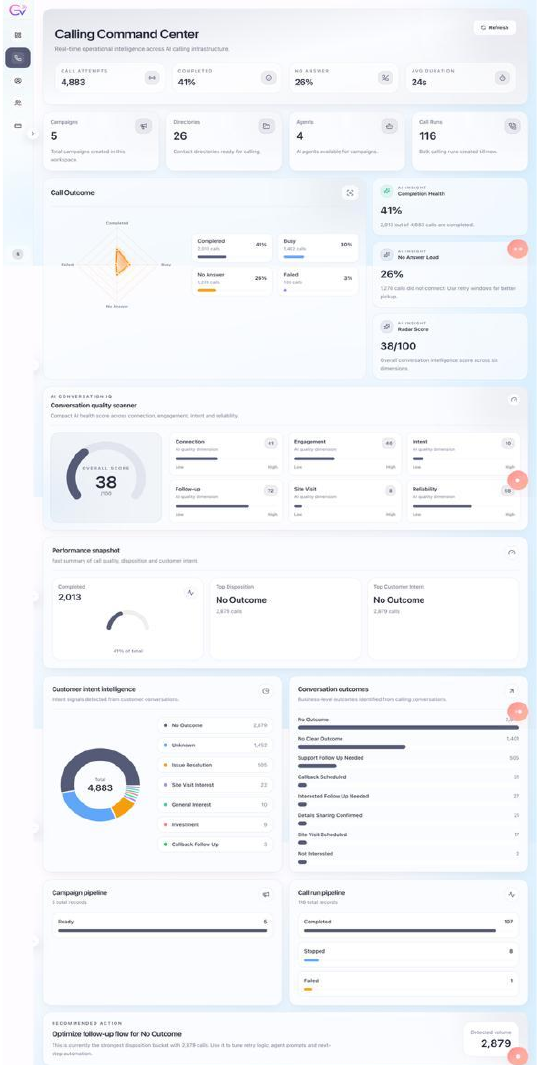
See the product behind the conversation. Explore your dashboards, agents and campaign reports.

A clearer picture of every campaign.

Track call activity, campaign trends and customer outcomes. Move from a call attempt to the information your team needs to act.

  • See campaign performance and calling volume.
  • Review outcomes, transcripts and summaries.
  • Use the AI reporting assistant to explore what happened.
View full image goVaani analytics dashboardEnlarge image ↗

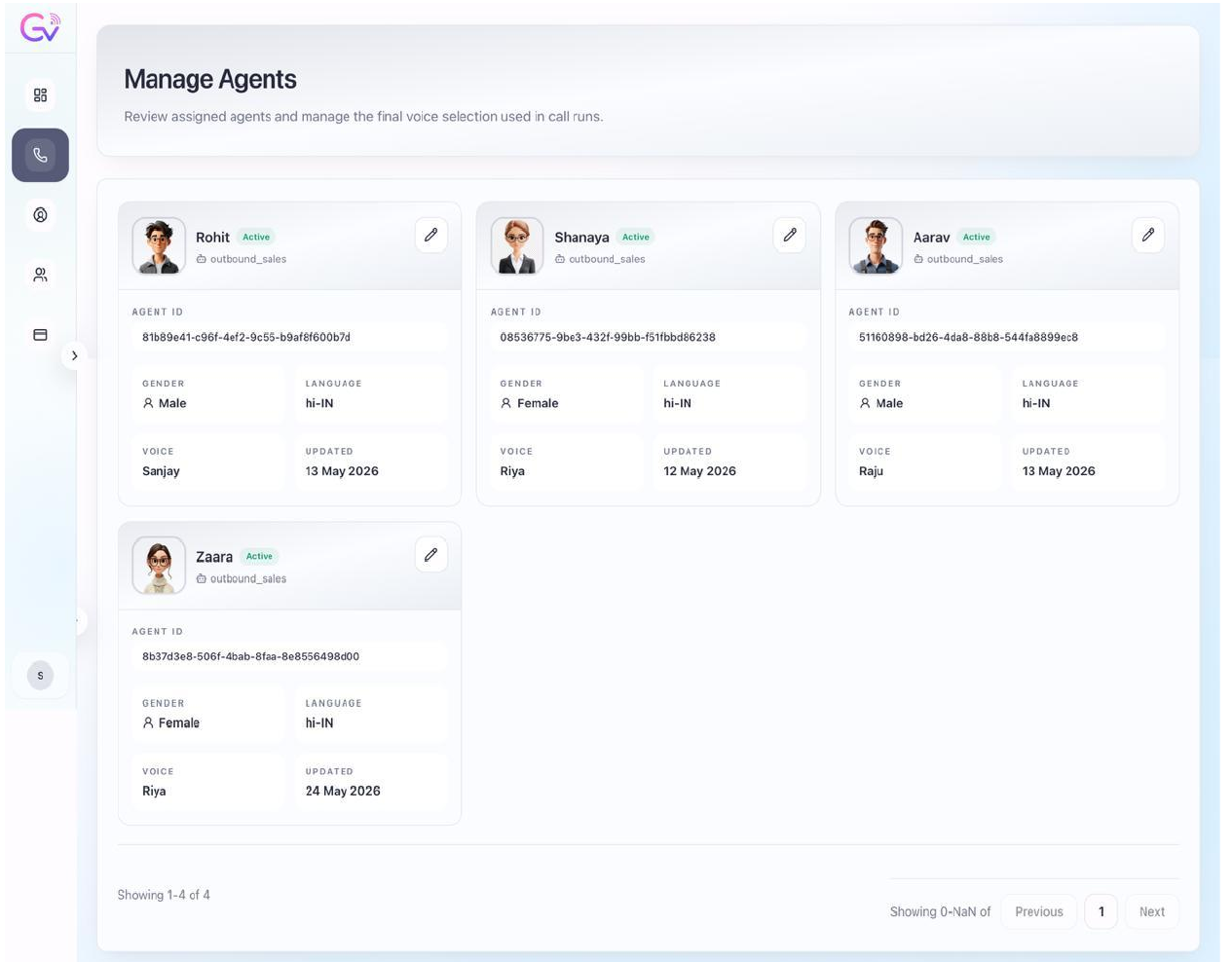
Your process. Your language. Your agent.

Configure agents around your business objectives, tone and workflow. Improve conversations with learnings your team reviews and approves.

  • Choose the agent for the process and language.
  • Keep customer-specific behavior aligned to your team.
  • Review and approve learnings before they are applied.
View full image goVaani agent managementEnlarge image ↗

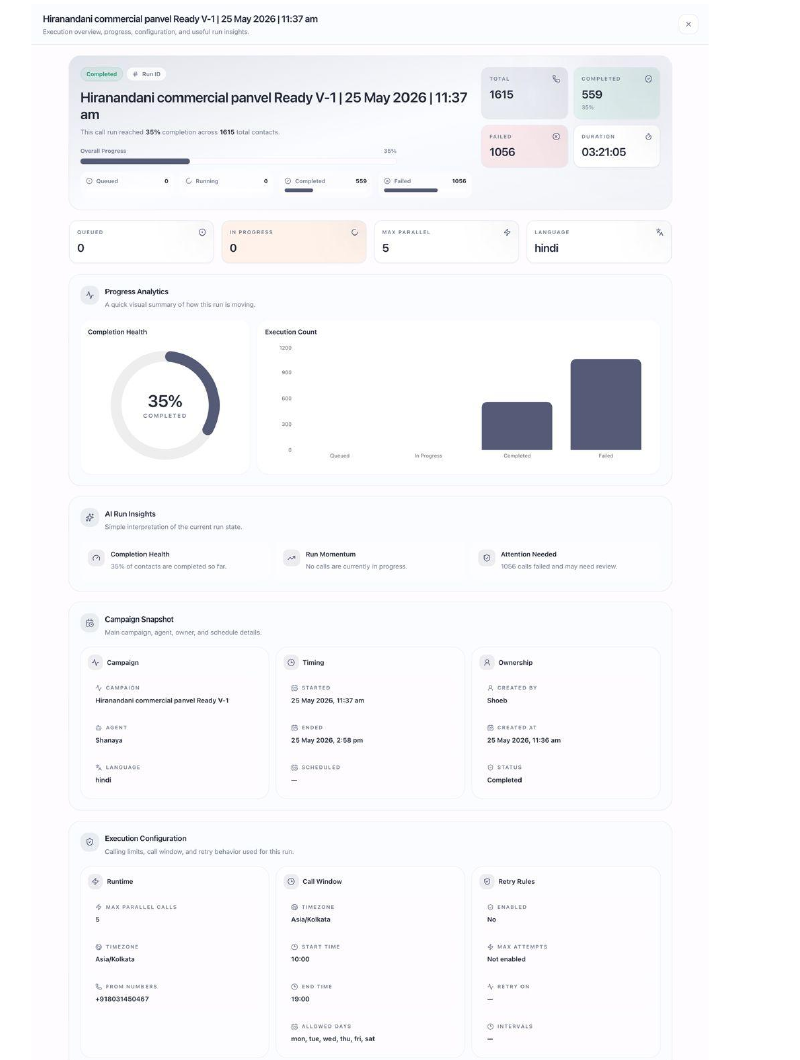
The detail behind the conversation.

Bring recordings, transcripts, summaries and dispositions together. Give your team a record of the call and a clear next action.

  • Review campaign results and call evidence.
  • Keep outcomes grouped by workflow.
  • Connect reporting to follow-ups and your CRM.
View full image goVaani campaign reportsEnlarge image ↗
goVaani workspace
goVaani analytics dashboardView full image ↗
01 / Analytics dashboardProduct interface previews

Every attempt has
a next step.

Run the operational layer around every campaign. Keep the calling, the evidence and the follow-through connected.

01

Live & scheduled calling

Launch immediate runs or schedule campaigns, callbacks and follow-up windows.

02

Configurable auto reattempts

Retry with configurable time gaps and campaign rules, so leads do not disappear from the queue.

03

Automated follow-ups

Trigger callbacks and follow-up calls without depending on manual team reminders.

04

Call evidence & records

Access recordings, transcripts, summaries and dispositions alongside business-ready reporting.

05

AI reporting assistant

Ask questions about campaign performance, objections, lead quality and outcomes.

06

Connected post-call actions

Share material on WhatsApp or email, notify your team and trigger the next workflow.

07

Learning with approval

Review and approve what an agent learns before it is applied to future calls.

08

CRM & API integration

Connect your forms, CRMs, lead systems and internal operations through APIs and workflow hooks.

A thoughtful rollout.
A repeatable workflow.

Bring one campaign, your script, FAQs and lead list. Start with a test call, then scale based on what you learn.

  1. 01

    Create the campaign

    Add your campaign goal, script, FAQs, documents and workflow information.

  2. 02

    Upload your contacts

    Upload a CSV or add the lead list you want the campaign to call.

  3. 03

    Select the AI agent

    Choose the agent for your process, language and communication tone.

  4. 04

    Run a test call

    Validate the conversation flow, voice quality and qualification behavior.

  5. 05

    Go live

    Start live calls, scheduled callbacks, retries and automated follow-ups.

  6. 06

    Review & optimize

    Review outcomes, reporting and approved learnings to improve future calls.

Outcome → Retry or callback → WhatsApp / email → Team notification → CRM update → Next action

Choose the actions that fit your workflow.

Your industry.
Your kind of conversation.

Qualification, reminders, verification and follow-up. Map your existing process into a consistent calling workflow.

Qualify leads. Book site visits.

For builders, channel partners and project sales teams that need instant first contact and structured follow-up.

Example workflow
  1. Ask budget, location, project preference and timeline.
  2. Share a brochure or price sheet on WhatsApp after the call.
  3. Trigger site-visit booking or a callback for hot leads.

Keep admissions moving.

Counseling follow-ups, program-fit checks and reminder calls for institutes, edtech teams and training centers.

Example workflow
  1. Confirm interest, course, city and preferred intake.
  2. Schedule counseling or a campus visit from the call.
  3. Send prospectuses and application links.

A reminder that makes a difference.

Appointment reminders, feedback calls and service updates for clinics, hospitals and wellness providers.

Example workflow
  1. Confirm patient identity, appointment date and doctor.
  2. Collect rescheduling intent and a preferred callback slot.
  3. Share visit details and preparation instructions.

Structured calls. Clear records.

Support KYC flows, policy validation, customer verification and document-related confirmation.

Example workflow
  1. Verify identity fields through a guided conversation.
  2. Capture dispositions and escalation flags.
  3. Log outcomes back to your CRM or internal system.

Close the follow-up loop.

Payment reminders, service-issue follow-up, complaint resolution and post-ticket quality checks.

Example workflow
  1. Remind customers about due payments or open tickets.
  2. Collect updated intent, promise-to-pay or issue status.
  3. Trigger the next call, handoff or notification.

Bring the process you already trust.

Connect your forms, CRMs, lead systems and internal operations to your own calling and post-call automation.

Example workflow
  1. Use your own script, dispositions and retry logic.
  2. Push summaries, recordings and outcomes to your stack.
  3. Keep records and outcomes grouped by workflow.
45,000+

Monthly calls handled at current production volume

24/7

An always-ready calling layer for your workflows

4 languages

Hindi, English, Gujarati and Marathi live today

Customer-specific agents. Approved learnings. Clear records and outcomes.

Good questions.
Clear answers.

Have a workflow-specific question? Talk to the team about your requirements.

Ask us something else ↗
Which languages are supported today?

goVaani supports Hindi, English, Gujarati and Marathi today, with more Indian languages planned.

Can we start with a pilot before a full rollout?

Yes. Start by building the agent, running test calls and going live on one workflow. Review quality and outcomes, then scale based on results.

Does the platform only place calls?

No. It also handles retries, callbacks, follow-up automation, notifications, call records, reporting and agent learning. Post-call actions can include WhatsApp or email sharing and CRM updates.

Can it work with our CRM or internal systems?

Yes. goVaani can integrate with CRMs and internal systems through APIs and workflow hooks. Discuss your specific systems and requirements with the team.

How do agents learn without losing control?

Your team can review and approve learnings before they are applied. Agent behavior stays aligned to your process, objectives and communication tone.

What can we review after a call?

The platform brings together recordings, transcripts, summaries, dispositions and campaign reporting, so your team can understand the outcome and decide what happens next.

Bring your workflow.
We’ll bring the voice.

Speak with the goVaani team about your calling volume, integrations, campaign goals and pilot requirements.

Visit the portal

Start with one workflow.
Test the experience. Then scale.

Product screenshot